
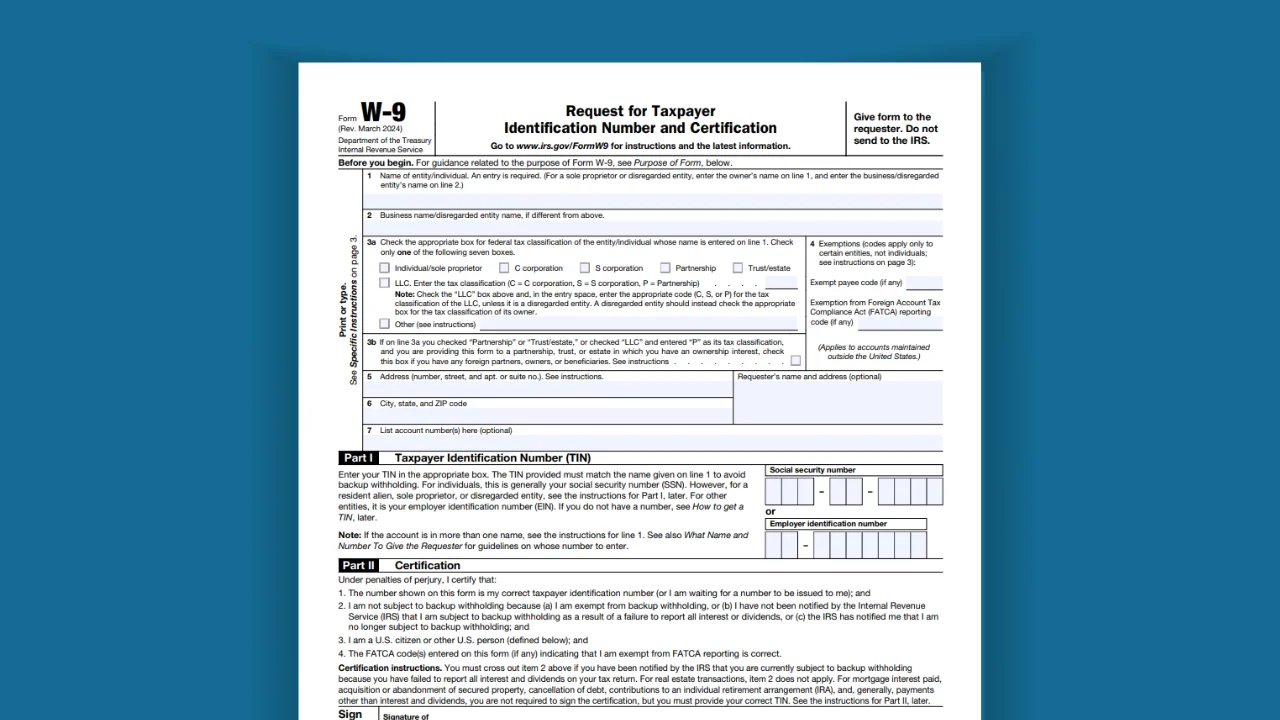
If someone just handed you a W-9 and you’re not sure what it is or what to do with it you’re in exactly the right place. A lot of people feel a little panicked the first time they see this form. It looks official. It has the IRS logo on it. There are pages of instructions attached.
But here’s the truth: filling out a W-9 is a lot simpler than it looks. It’s basically just a form that tells whoever is paying you who you are, so they can properly report that payment to the IRS later. That’s really the whole point of it.
Its full official name is the “Request for Taxpayer Identification Number and Certification.” In plain English, that just means: “Please give me your name and tax ID number, and confirm that the information is correct.”
One very important thing to know upfront: you don’t send this form to the IRS. You fill it out and give it back to the person or company that asked you for it. They keep it on file and use it when they need to report your income to the IRS at the end of the year.
📌 New to this? Think of the W-9 like giving a new client your business card – except instead of a phone number, you’re sharing your tax ID. It’s just paperwork that lets them pay you properly.
Income Tax Terms
Before we go any further, let’s quickly define the words that tend to trip people up. You’ll see these throughout this article and on the form itself.
Taxpayer Identification Number (TIN)
This is just a number the IRS uses to identify you for tax purposes. For most individuals, it’s your Social Security Number — the same number on your Social Security card. If you’ve set up a business, it might be an Employer Identification Number (EIN) instead. Think of it as your “tax ID.”
Social Security Number (SSN)
The 9-digit number assigned to you by the Social Security Administration. You’ve had it since you were born (or since you moved to the U.S.). It looks like this: 123-45-6789. If you work as a freelancer or independent contractor without a formal business entity, this is almost always the number you’ll put on your W-9.
Employer Identification Number (EIN)
If you’ve set up an official business like an LLC or a corporation, the IRS gives your business its own separate tax ID called an EIN. It works the same way a Social Security Number does, but it’s tied to the business rather than to you personally. You apply for one for free at IRS.gov.
Backup Withholding
This one sounds scarier than it is. If you don’t fill out a W-9 correctly or at all, the person paying you is required by law to hold back 24% of your payment and send it to the IRS on your behalf. That’s called backup withholding. Filling out your W-9 properly is how you avoid this. In other words: do the form right, keep your full paycheck.
1099 Form
At the end of the year, if someone paid you $600 or more for your work, they’re required to send you a form called a 1099 that summarizes what they paid you. They need your W-9 information – your name and TIN – to fill that form out correctly. The 1099 is then sent to both you and the IRS, so you can report that income on your taxes.
📌 Quick analogy: The W-9 is the setup form. The 1099 is the year-end report. You fill out the W-9 once for each client or payer; they handle the 1099 at tax time.
Why is the W-9 Tax Form Used?
When you work for a company as a regular employee, your employer automatically takes taxes out of every paycheck. You’ve probably seen the deductions on your pay stub. That’s all handled through a different form called a W-4, which you fill out when you get hired.
But when you work as a freelancer, independent contractor, or self-employed person, nobody withholds taxes for you. You’re responsible for paying your own taxes and the businesses that hire you are responsible for reporting what they paid you to the IRS.
That’s exactly where the W-9 comes in. It gives the payer your correct name and tax ID number so they can file that year-end 1099 report accurately. Without your W-9, they can’t file correctly and if they can’t file correctly, they’re required to withhold a chunk of your money as a precaution (that’s the backup withholding we mentioned above).
So filling out a W-9 is really in your best interest. It keeps your payments clean, it keeps the payer’s records straight, and it makes tax season smoother for everyone.
Who Needs to Fill Out a W-9?
The short answer: if someone is paying you for your work and you’re not their regular employee, you’ll almost certainly be asked for a W-9 at some point. This covers a wide range of people:
- Freelancers — writers, designers, photographers, videographers, editors
- Independent contractors — plumbers, electricians, handypeople, cleaners
- Consultants or coaches hired on a project basis
- Gig economy workers — delivery drivers, rideshare drivers, task-based workers
- Small business owners who provide services (landscaping, bookkeeping, web design, etc.)
- Real estate agents earning commissions
- Anyone receiving payments for rent, interest, or dividends
If any of those describe you, getting comfortable with the W-9 is a good idea. You’ll likely fill out several of them over the course of your career.
Who Won’t Needs to Fill Out a W-9?
Not every payment situation requires a W-9. Here are the common exceptions:
- You’re a regular employee — your employer uses the W-4 and payroll system instead
- You’re selling physical products or merchandise (not services)
- The person paying you is paying a corporation — most payments to corporations don’t require a W-9
- You earned less than $600 from a single payer in the year — they may not be required to file a 1099 for you
📌 Not sure which applies to you? Ask the person requesting the form. They’ll know whether they need it. If they’re asking, they almost certainly do.
How to Complete Form W-9: Step by Step for Every Business Type
This is the part that confuses most people and honestly, it shouldn’t. The confusion usually comes from one thing: the form looks the same for everyone, but what you write on it depends on how your business is set up.
Let’s walk through each situation. We’ll use a fictional person named John Doe as our example throughout, and assume he runs a landscaping business called Sunshine Landscaping.
First: Understanding the Form’s Layout
The W-9 has a few key fields. Here’s what each one means before we get into the scenarios:
- Line 1 — Your name (or your business name, depending on your situation). This is the most important line.
- Line 2 — A second name, if you have one (like a business name that’s different from Line 1).
- Box 3a — A checklist where you indicate what type of taxpayer you are (individual, LLC, corporation, etc.).
- Part I — Where you enter your tax ID number (SSN or EIN).
- Part II — The signature section. You sign and date here to certify everything is accurate.
Scenario 1: You Work Under Your Own Name (Sole Proprietor)
This is the simplest situation. You do freelance or contract work as an individual — no LLC, no business registration, no separate business name. You’re just you.
Line 1: Your full legal name. Example: John Doe.
Line 2: Leave this blank. You don’t have a separate business name.
Box 3a: Check the box that says “Individual / sole proprietor.”
Tax ID to use: Your Social Security Number. The IRS specifically recommends this for sole proprietors.
That’s it. Four decisions, and you’re done. This applies to the majority of first-time freelancers.
Scenario 2: You Have a DBA (“Doing Business As”) Name
Same as above, but you’ve registered a business name with your state. A DBA also called a fictitious name, trade name, or assumed name depending on your state just means you do business under a name that’s different from your own. John Doe might operate as Sunshine Landscaping without having formed an LLC or corporation.
Having a DBA doesn’t make you a different type of taxpayer. You’re still a sole proprietor. Here’s how the form changes:
Line 1: John Doe – your legal name still goes here, always.
Line 2: Sunshine Landscaping – your DBA name goes on this line.
Box 3a: Still “Individual / sole proprietor.” A DBA doesn’t change your tax classification.
Tax ID to use: Your Social Security Number is still preferred here.
Scenario 3: You Have a Single-Member LLC
You went through the process of registering a Limited Liability Company (LLC) with your state — but only you own it. That’s a single-member LLC.
Here’s something a lot of people don’t know: by default, the IRS treats a single-member LLC as what they call a “disregarded entity.” That’s just tax-speak for: the IRS ignores the LLC and taxes you as if it doesn’t exist exactly like a sole proprietor. Your business income still flows through to your personal tax return.
So for the W-9, it works almost identically to the sole proprietor scenarios above:
Line 1: John Doe – your personal legal name, not the LLC name. The IRS needs to connect this to your personal tax return.
Line 2: Sunshine Landscaping LLC – the LLC name goes here as the secondary name.
Box 3a: “Individual / sole proprietor” – because the IRS still treats you as one, even though you have an LLC.
Tax ID to use: Your Social Security Number is preferred. The IRS instructions specifically say so.
📌 Common mistake: A lot of single-member LLC owners put the LLC name on Line 1 and check the LLC box. That’s incorrect. Your name goes on Line 1.
Scenario 4: You Have a Multi-Member LLC
Your LLC has more than one owner (called “members” in LLC terminology). Maybe you and a business partner co-own it. In this case, the IRS automatically treats your LLC as a partnership for tax purposes meaning the LLC itself files a tax return, and profits flow through to each member’s personal return.
This changes how you fill out the W-9:
Line 1: Sunshine Landscaping LLC – the business name goes here now, not your personal name.
Line 2: Leave blank.
Box 3a: Check “LLC” and write the letter “P” (for Partnership) in the small box next to it.
Tax ID to use: Your EIN – the business’s tax ID number. Not your Social Security Number.
If you don’t have an EIN yet, you can apply for one for free at IRS.gov/EIN. It only takes about 10 minutes online.
Scenario 5: Your LLC Has Elected S Corporation Tax Status
This one requires a bit of background. When you have an LLC, whether single-member or multi-member, you can choose to have it taxed differently by filing a special election form with the IRS (called Form 2553). One popular option is electing to be taxed as an S corporation.
Why would someone do this? Mainly for potential tax savings once the business is earning a certain level of income. But that’s a topic for a tax professional to advise on. What matters here is how it affects your W-9:
Line 1: Sunshine Landscaping LLC, the business name.
Line 2: Leave blank.
Box 3a: Check “LLC” and write “S” in the small classification box (for S corporation).
Tax ID to use: Your EIN.
Scenario 6: You Have an Incorporated Business Taxed as an S Corporation
This is slightly different from the scenario above. Instead of forming an LLC that elected S Corp status, you actually incorporated your business meaning you filed as “Incorporated” (or “Inc.”) with your state. Then you separately elected to have that corporation taxed as an S corporation.
Line 1: Sunshine Landscaping Incorporated exactly as it appears in your state registration.
Line 2: Leave blank.
Box 3a: Check “S corporation” directly. Don’t check the LLC box you didn’t form an LLC.
Tax ID to use: Your EIN.
The One Thing Almost Everyone Forgets: Sign and Date the Form
Seriously, this is the single most common reason W-9s get sent back. The form has a signature line in Part II at the bottom. By signing, you’re officially confirming that everything you wrote is accurate and complete.
Without a signature and date, the form is not valid. The payer can’t accept it. So before you hand it over or email it, double-check that Part II is signed, dated, and complete.
📌 Quick reminder: Sign it. Date it. Then send it. It sounds obvious until you’re the fifth person in a month who forgot.
What Goes Where Based on Your Business Type
Here’s a simple cheat sheet you can come back to whenever you need it:
- Just you, no business name → Your name on Line 1, your SSN, check Individual/Sole Proprietor
- You + a DBA name → Your name on Line 1, DBA on Line 2, your SSN, check Individual/Sole Proprietor
- Single-member LLC → Your name on Line 1, LLC name on Line 2, your SSN preferred, check Individual/Sole Proprietor
- Multi-member LLC → LLC name on Line 1, your EIN, check LLC and write P
- LLC taxed as S corp → LLC name on Line 1, your EIN, check LLC and write S
- Corporation taxed as S corp → Corp name on Line 1, your EIN, check S corporation
The Bottom Line
When you see it for the first time, a W-9 can look like a lot. But it really isn’t. It’s a short form asking for your name, your business information if you have one, and your tax ID. You fill it out once for each new client or payer, hand it over, and move on.
The key is just knowing which version of the form applies to your situation and that’s exactly what we walked through above. Whether you’re a straightforward freelancer working under your own name or a business owner with an LLC that’s elected S corp status, there’s a clear and specific way to fill it out. Now you know how.
If you ever feel uncertain, especially about which box to check in Box 3a or which tax ID to use, it’s worth a quick conversation with a CPA or tax professional before you submit. Getting it right the first time saves everyone the trouble of sorting it out later.
To download the current version of the form, visit IRS.gov/FormW9. The latest blank W-9 is always available there for free.